Creating a New Product
Learn how to add products and services to your LKG Billing catalog.
➕ Adding a Product
Follow these steps to create a new product or service.
Step 1: Navigate to Products
From the dashboard or main menu, click on Products.
Step 2: Click "Add Product"
Look for the "Add" or "New Product" button (usually with a ➕ icon).
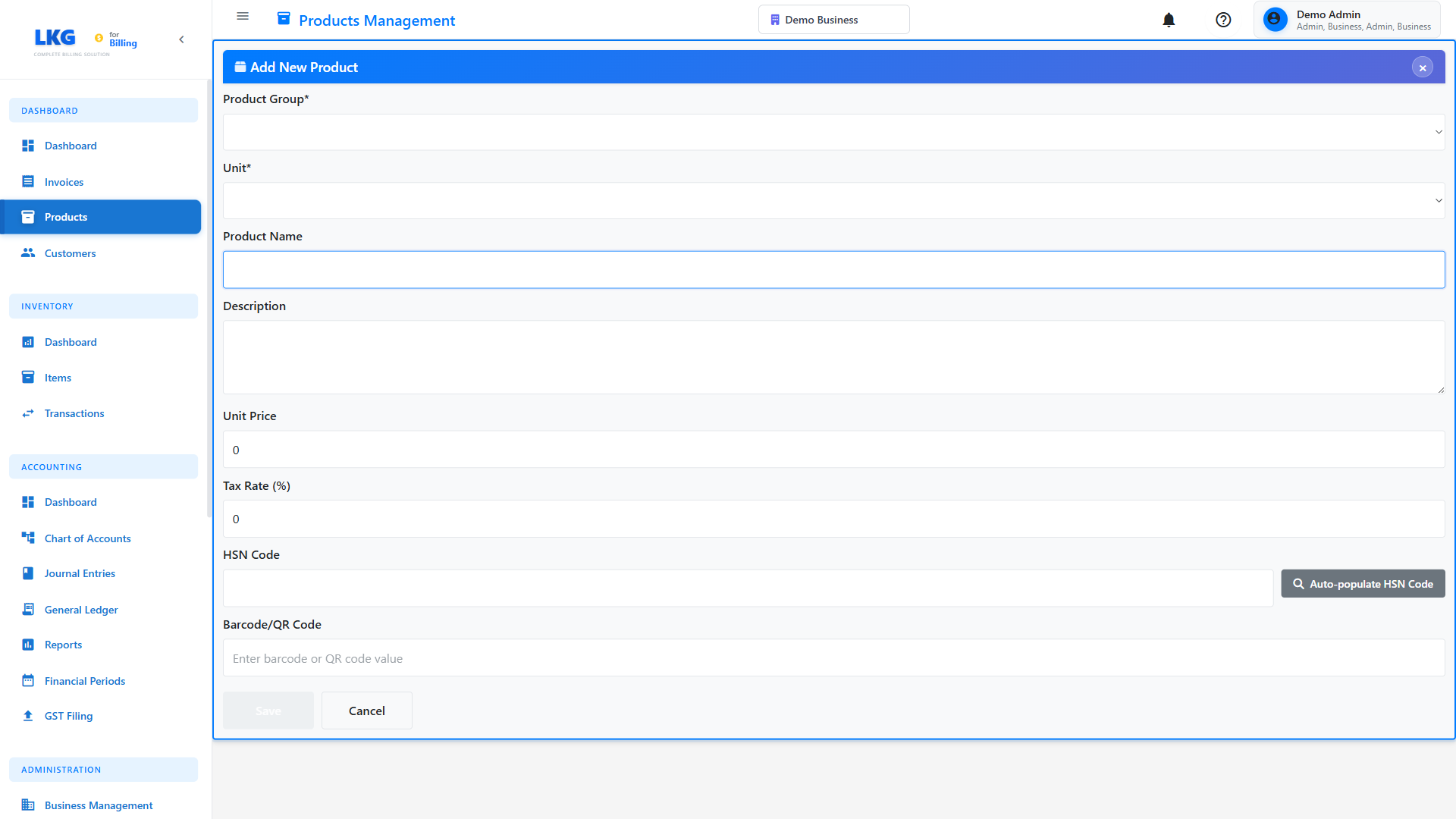
Step 3: Fill in Product Information
Complete the product creation form with the following details:
📝 Required Fields
Product Name
The name of your product or service as it will appear on invoices.
Examples:
Professional IT ConsultingWebsite Design PackageAnnual Software LicenseMonthly Maintenance Service
Use clear, descriptive names that customers will easily understand on invoices.
Price
The unit price for this product/service.
Examples:
1500.00- Per hour consulting rate25000.00- Website package price999.00- Monthly subscription
- Enter numbers only (no currency symbols)
- Use decimal point for cents/paise:
1500.50 - The currency symbol will be added automatically based on your settings
📋 Optional Fields
SKU / Product Code
A unique identifier for this product.
Format Examples:
CONS-001- Consulting Service 001WEB-PKG-BASIC- Web Package BasicLIC-ANNUAL-2024- Annual License 2024MAINT-MONTHLY- Monthly Maintenance
- Keep it short and memorable
- Use consistent format across all products
- Include category prefix for easy identification
Description
Detailed information about the product/service.
Example:
Professional IT consulting services including:
- System analysis and design
- Technical architecture planning
- Code review and optimization
- Performance tuning
- Security assessment

Hourly rate with minimum 2-hour engagement.
Category
Group similar products together.
Common Categories:
- Services
- Products
- Subscriptions
- Software
- Hardware
- Consulting
- Design & Creative
Unit
The unit of measurement for this product.
Examples:
Hour- For hourly servicesDay- For daily ratesPiece- For individual itemsLicense- For software licensesMonth- For subscriptionsProject- For fixed projects
Tax Rate
Applicable tax percentage.
Examples:
18- For 18% GST (India)12- For 12% GST0- For tax-exempt items20- For 20% VAT (UK)
💼 Sample Product Data
Here are complete examples for practice:
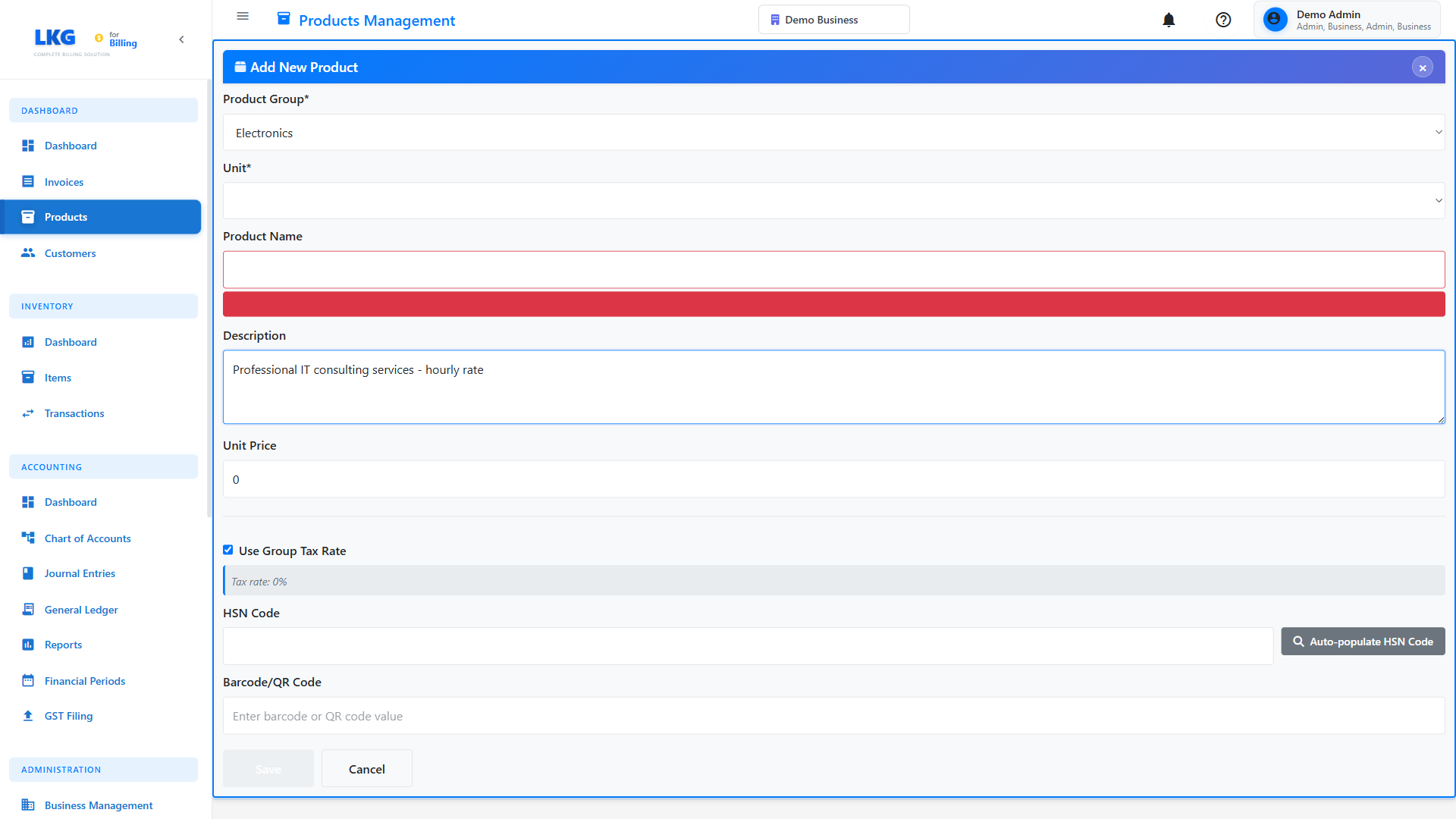
Sample Service:
Name: Professional Consulting
SKU: CONS-001
Price: 1500
Description: Professional IT consulting services - hourly rate
Category: Services
Unit: Hour
Tax Rate: 18
Sample Product:
Name: Enterprise Software License
SKU: SOFT-ENT-001
Price: 25000
Description: Annual enterprise software license for up to 50 users
Category: Software
Unit: License
Tax Rate: 18
Sample Subscription:
Name: Monthly Support Plan
SKU: SUP-MONTHLY
Price: 5000
Description: 24/7 technical support with 4-hour response time
Category: Subscriptions
Unit: Month
Tax Rate: 18
✅ Step 4: Save the Product
Once all information is entered:
- Review the details for accuracy
- Click the "Save" or "Create Product" button
- Wait for the confirmation message
- The new product will appear in your catalog
Look for a green confirmation message like "Product created successfully!"
❌ Common Validation Errors
Product Name Required
Error: "Product name is required"
Solution: Enter a descriptive name for the product
Invalid Price
Error: "Please enter a valid price"
Solution: Enter a positive number (use decimal point, not comma)
Duplicate SKU
Error: "A product with this SKU already exists"
Solution: Use a unique SKU code or leave it blank to auto-generate
Price Must Be Positive
Error: "Price must be greater than zero"
Solution: Enter a positive number for the price
🎯 After Creating a Product
Once created, you can:
- Add to Invoice - Use this product when creating invoices
- Edit Details - Update product information anytime
- Set Variations - Create size/color variants (if supported)
- Track Usage - See which invoices use this product
💡 Best Practices
- Standardize SKUs - Use a consistent format for all product codes
- Detailed Descriptions - Include everything customers need to know
- Accurate Pricing - Factor in all costs and your profit margin
- Use Categories - Makes finding products easier when creating invoices
- Tax Compliance - Set correct tax rates for your region
- Regular Reviews - Update prices and descriptions periodically
📊 Product Pricing Strategies
Hourly Services
Name: Junior Developer - Hourly
Price: 800
Unit: Hour

Name: Senior Developer - Hourly
Price: 1500
Unit: Hour
Package Deals
Name: Basic Website Package
Price: 15000
Description: 5-page website with contact form

Name: Premium Website Package
Price: 35000
Description: 10-page website with e-commerce
Subscription Services
Name: Bronze Support Plan
Price: 2500
Unit: Month

Name: Gold Support Plan
Price: 7500
Unit: Month
🔄 Quick Actions
After creating a product, you might want to:
- Create an Invoice - Use this product in an invoice
- Add More Products - Build your complete catalog
- Product Groups - Organize products better
Product created? Learn how to create invoices next! 👉