Product Management Overview
Learn how to manage your product and service catalog in LKG Billing.
📦 What are Products?
Products are the goods or services you sell to your customers. The Product Management section helps you:
- Create a catalog of products and services
- Set pricing and descriptions
- Track inventory (if enabled)
- Quickly add items to invoices
📋 Product List View
When you navigate to the Products section, you'll see your complete catalog.
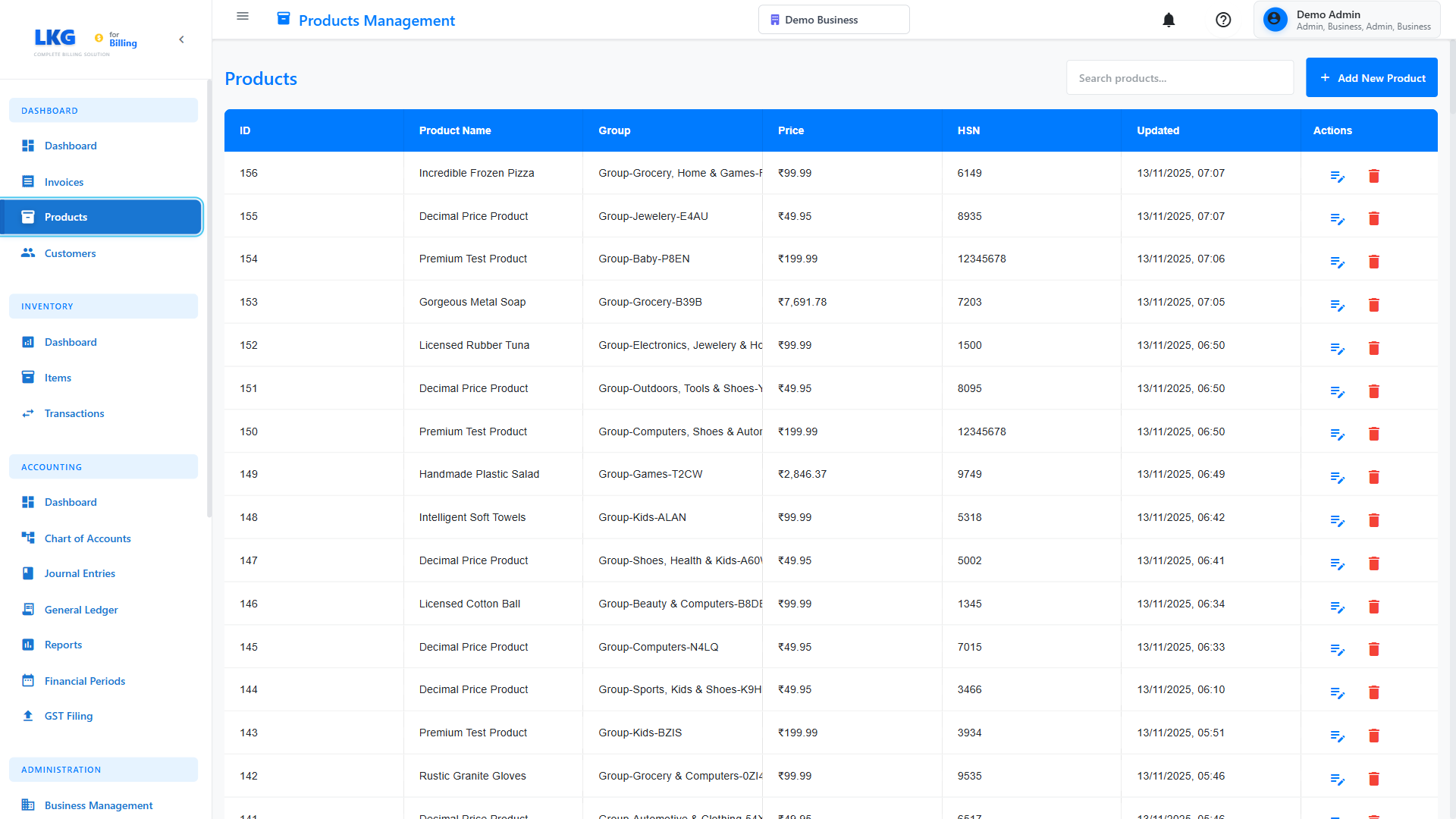
List Features
- Search Bar - Find products by name, SKU, or description
- Filter Options - Sort by name, price, or category
- Add Product Button - Create new products
- Product Cards/Table - View all product details
Each product entry typically shows:
- Product name
- SKU/Code
- Description
- Price
- Category
- Stock status (if inventory tracking enabled)
🔍 Searching for Products
Use the search functionality to quickly find products:
- Click in the Search box
- Type product name, SKU, or keyword
- Results filter automatically
Example searches:
Consulting- Find all consulting servicesCONS-001- Find product by SKU codeSoftware- Find all software products
📊 Product Information
Click on any product to view full details:
- Basic Information - Name, SKU, description
- Pricing - Unit price, tax rates
- Categories - Product categorization
- Inventory - Stock levels (if applicable)
- Usage History - Invoices using this product
🎯 Common Product Actions
Add New Product
Learn how to create a new product.
Edit Product
- Find the product in the list
- Click the Edit button (pencil icon)
- Update the information
- Click Save
Delete Product
- Find the product in the list
- Click the Delete button (trash icon)
- Confirm the deletion
Deleting a product will not affect existing invoices that use it, but it won't be available for new invoices.
Duplicate Product
Quickly create similar products:
- Find the product to duplicate
- Click Duplicate or Copy
- Modify the name and details
- Save as new product
🏷️ Product Types
LKG Billing supports different product types:
Physical Products
Tangible goods you sell:
- Electronics
- Furniture
- Merchandise
- Supplies
Services
Intangible services you provide:
- Consulting hours
- Design services
- Maintenance contracts
- Subscriptions
Digital Products
Digital goods:
- Software licenses
- E-books
- Online courses
- Downloads
💡 Product Management Tips
- Use SKUs - Assign unique SKU codes for easy identification
- Clear Descriptions - Write detailed product descriptions
- Accurate Pricing - Include all costs in the unit price
- Organize with Categories - Group similar products together
- Regular Updates - Keep prices and descriptions current
📤 Importing Products
Import existing product data:
- Prepare a CSV file with product information
- Go to Settings → Import/Export
- Choose Import Products
- Upload your CSV file
- Map columns to fields
- Click Import
CSV Format Example:
Name,SKU,Price,Description,Category
Professional Consulting,CONS-001,1500,IT consulting services - hourly,Services
Web Design,WEB-001,5000,Website design package,Services
Software License,SOFT-001,2500,Annual software license,Digital
📊 Product Categories
Organize products into categories:
Example Categories:
- Services
- Consulting
- Design
- Development
- Products
- Hardware
- Software
- Accessories
- Subscriptions
- Monthly
- Annual
🚀 Next Steps
- Create Your First Product - Step-by-step guide
- Product Groups - Organize your catalog
- Edit/Delete Products - Manage existing products
Ready to add products? Click Next to learn how to create a new product! 👉