Deleting Invoices
Learn when and how to delete invoices, understand deletion restrictions, and maintain proper audit trails.
🗑️ Deletion Rules by Status
Different invoice statuses have different deletion policies:
| Status | Can Delete? | Conditions |
|---|---|---|
| Draft | ✅ Yes | Anytime, no restrictions |
| Finalized/Sent | ⚠️ Limited | Admin only |
| Paid | ❌ No | Cannot delete, use credit note |
Deleting invoices with payments can violate accounting regulations. Always use credit notes for paid invoices.
Deleting Draft Invoices
Single Draft Deletion
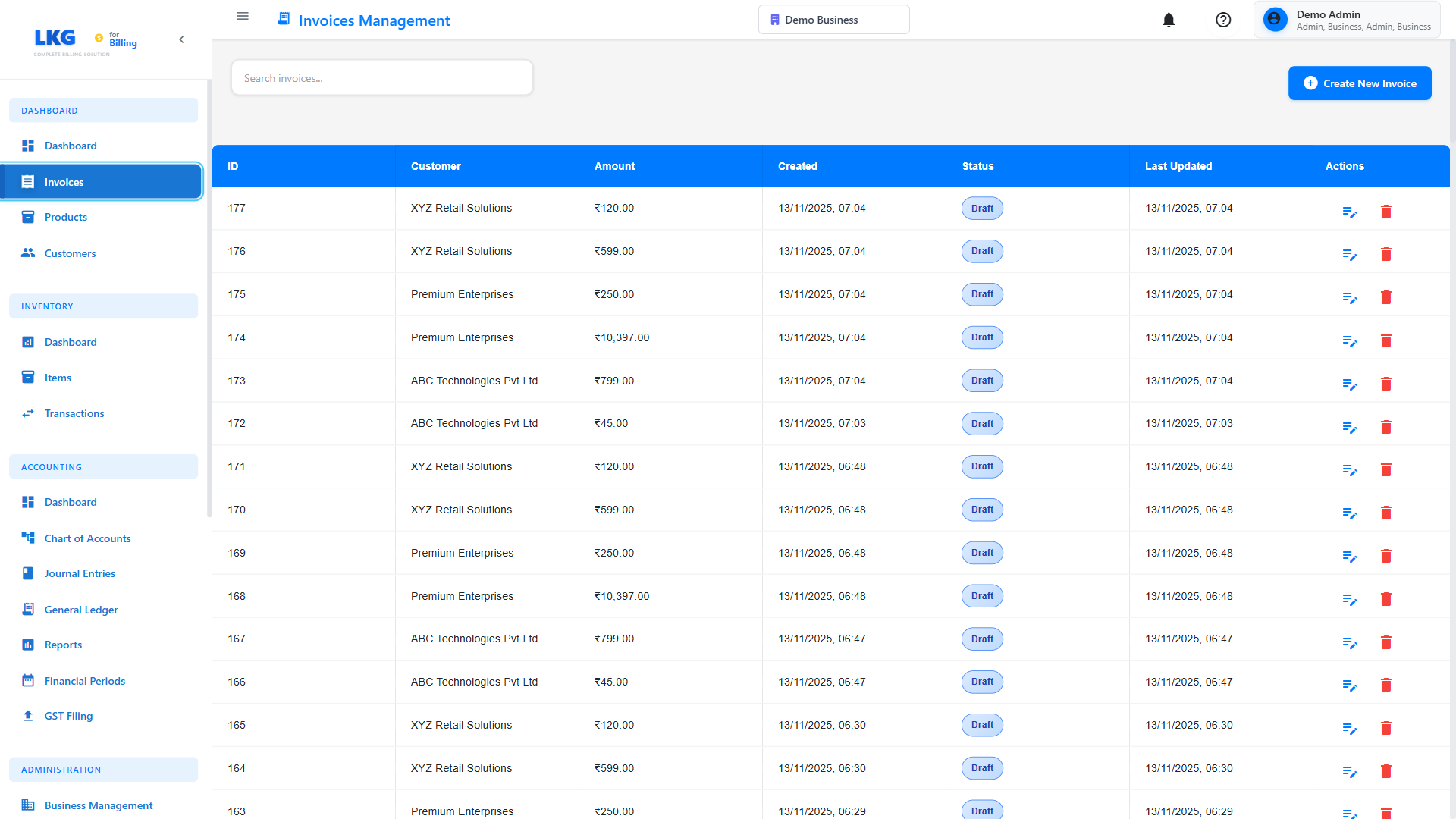
Draft invoices can be deleted freely:
- Go to Invoices page
- Filter by Draft status (optional)
- Find the draft invoice
- Click Actions menu (⋮)
- Select Delete
- Confirm deletion in the popup
- Invoice is permanently removed
Bulk Draft Deletion
Delete multiple drafts at once:
- Filter invoices to show Drafts
- Select checkboxes next to invoices to delete
- Click Bulk Actions dropdown
- Select Delete Selected
- Confirm bulk deletion
- All selected drafts are removed
Draft invoices haven't been sent to customers and don't affect accounting, so they're safe to delete.
Deleting Finalized/Sent Invoices
Deletion Restrictions
Finalized invoices have strict deletion rules:
❌ Regular Users - Cannot delete finalized invoices
⚠️ Admin Users - May be able to delete with audit log
✅ Recommended - Use void instead of delete
Admin Deletion Process
If deletion is absolutely necessary (admin only):
- Verify you have admin permissions
- Open the finalized invoice
- Click Actions → Delete
- System may show warning
- Enter deletion reason (required)
- Confirm deletion
- Entry added to audit log
Audit Log Entry:
Nov 20, 2024 3:45 PM - Admin User
Action: Deleted Invoice #INV-2024-156
Reason: Duplicate invoice created in error
Previous Status: Finalized
Amount: ₹5,000
Customer: ABC Corp
Better Alternative: Cancel Invoice
Instead of deleting finalized invoices, contact your administrator to handle the situation appropriately based on your business process.
Cannot Delete Invoices
Invoices with Payments
Invoices that have received any payment cannot be deleted:
❌ Partially Paid invoices
❌ Fully Paid invoices
❌ Overpaid invoices
Reason: Deleting would break accounting records and payment tracking.
Solution: Void and Credit Note
For paid invoices that need correction:
- Do NOT delete the paid invoice
- Create a Credit Note for the full amount
- This reverses the invoice in accounting
- Create a new correct invoice if needed
- Both invoices remain in system for audit trail
Example:
Original Invoice: INV-001 for ₹10,000 (Paid)
Credit Note: CN-001 for -₹10,000 (cancels INV-001)
New Invoice: INV-002 for ₹8,000 (correct amount)
Net Effect: ₹8,000 invoice, ₹2,000 credit to customer
Deletion Permissions
User Roles
Admin/Owner:
- Can delete draft invoices
- Can delete finalized invoices (with restrictions)
- Cannot delete paid invoices
- All deletions logged
Manager:
- Can delete own draft invoices
- May be able to delete team's finalized invoices
- Cannot delete paid invoices
- Requires approval for deletions
Regular User:
- Can delete own draft invoices
- Cannot delete finalized invoices
- Cannot delete paid invoices
- Limited deletion access
Read-Only User:
- Cannot delete any invoices
- View-only access
Requesting Deletion Permission
If you need to delete an invoice but don't have permission:
- Contact your system administrator
- Provide invoice number and reason
- Wait for approval or admin to delete
- Admin may void instead of delete
When to Delete
Use deletion for:
✅ Draft invoices - Not needed anymore
✅ Duplicate drafts - Created by mistake
✅ Test invoices - Created during system testing
✅ Incomplete work - Abandoned invoice attempts
Finalized invoices should not be deleted. Contact your administrator if you need to cancel a sent invoice.
Soft Delete vs. Hard Delete
Some systems use two types of deletion:
Soft Delete (Archive)
- Invoice marked as deleted but not removed
- Can be recovered/undeleted
- Still in database, just hidden
- Maintains complete history
- Preferred for finalized invoices
Hard Delete (Permanent)
- Invoice permanently removed from database
- Cannot be recovered
- No history preserved
- Only for drafts in most systems
- Use with extreme caution
Recovering Deleted Invoices
Undelete Soft-Deleted Invoices
If using soft delete:
- Go to Invoices → Deleted Invoices or Trash
- Find the deleted invoice
- Click Restore or Undelete
- Invoice returns to original status
- All data preserved
Soft-deleted invoices may auto-purge after 30-90 days. Restore before then!
Cannot Recover Hard-Deleted
Hard-deleted invoices cannot be recovered:
- No restore option available
- Must recreate from scratch
- Check backups if critical
- Contact support for database recovery (may not be possible)
Cascade Deletion Effects
What Happens When You Delete an Invoice
Deleting an invoice affects related records:
Deleted:
- Invoice header information
- Line items (products/services)
- Applied discounts
- Tax calculations
May Be Deleted:
- Draft-only attachments
- Unpublished comments/notes
NOT Deleted:
- Customer record
- Product records
- Payment records (if any exist, invoice cannot be deleted)
- Email history
- Audit logs
Orphaned Records
After deletion, check for:
- Unlinked payments (shouldn't happen if system prevents deletion)
- Floating credit notes
- Dangling references in reports
Common Deletion Scenarios
Scenario 1: Duplicate Draft Created
Problem: Accidentally created two draft invoices for same customer.
Solution:
- Identify which draft is correct
- Delete the duplicate draft
- Keep and finalize the correct one
Scenario 2: Sent Wrong Invoice to Customer
Problem: Sent invoice with wrong amount to customer.
Solution:
- Do NOT delete the sent invoice
- Email customer: "Please disregard INV-001, correct invoice to follow"
- Create new correct invoice (INV-002) with accurate information
- Send INV-002 to customer
- Keep the original for audit purposes
Scenario 3: Customer Canceled Order Before Payment
Problem: Customer canceled order, invoice was sent but not paid.
Solution:
- Do NOT delete the invoice
- Void the invoice with reason: "Order canceled by customer"
- Invoice number preserved for records
- Not included in revenue reports
Scenario 4: Need to Delete Old Test Invoices
Problem: System has test invoices from initial setup.
Solution:
- Filter invoices by early dates or test customer
- Verify they are test invoices (check for "test" in notes)
- Ensure they have no payments
- Bulk select test invoices
- Bulk delete (if admin)
- Or mark as voided with note "Test invoice"
Best Practices
Before Deleting
✅ Verify status - Check it's a draft or safe to delete
✅ Check for payments - Ensure no payments recorded
✅ Notify team - Inform others working on the invoice
✅ Document reason - Note why you're deleting
✅ Export data - Save a copy if needed for records
Instead of Deleting
✅ Void invoices - Better audit trail
✅ Create credit notes - Reverse paid invoices
✅ Archive old invoices - Keep but hide from active list
✅ Mark as canceled - If system has this status
✅ Add notes - Explain why invoice is invalid
Deletion Policy
Establish company policy:
- Drafts: Can be deleted freely
- Finalized: Void only, delete requires manager approval
- Paid: Never delete, use credit notes
- Retention: Keep all invoices for 7 years (adjust per local laws)
- Test data: Delete before going live
Audit Trail and Compliance
Deletion Logging
All invoice deletions should be logged:
Log Entry Includes:
- Who deleted (user name and ID)
- When deleted (date and time)
- What deleted (invoice number, customer, amount)
- Why deleted (reason entered by user)
- Previous status
Example Log:
Deleted Invoice Log Entry
------------------------
Date: Nov 20, 2024 4:15 PM
User: Jane Smith (Admin)
Invoice: INV-2024-234
Customer: XYZ Ltd
Amount: ₹7,500
Status: Finalized
Reason: Duplicate of INV-2024-235
IP Address: 192.168.1.100
Compliance Requirements
Different jurisdictions have different rules:
India (GST):
- Cannot delete invoices after GST filing
- Must maintain 6-year record
- Voiding is preferred to deletion
US (IRS):
- Keep records for 3-7 years
- Deleted invoices may trigger audits
- Maintain audit trails
EU (VAT):
- Cannot delete VAT invoices
- Must keep sequential numbering
- Voided invoices must be preserved
General Best Practice:
- Never delete paid invoices
- Maintain sequential invoice numbering
- Keep audit logs for all deletions
- Preserve records per legal requirements
Troubleshooting
Delete Button is Grayed Out
Possible Reasons:
- Invoice has payments (even ₹1)
- Invoice is paid or partially paid
- You don't have delete permission
- Invoice is locked by another user
- Invoice is finalized (depends on settings)
Solutions:
- Check invoice status
- Verify you have admin/delete permissions
- Check for any payments (even pending)
- Use void instead of delete
"Cannot Delete" Error Message
Common Error Messages:
"Invoice has payments and cannot be deleted"
- Solution: Void the invoice instead
"Insufficient permissions to delete invoice"
- Solution: Request admin access or ask admin to delete
"Invoice is locked for editing"
- Solution: Wait for other user to finish, or admin can unlock
"Cannot delete finalized invoice"
- Solution: System policy prevents deletion, use void
Accidentally Deleted Wrong Invoice
If Soft Delete:
- Go to Deleted/Trash immediately
- Restore the invoice
- All data recovered
If Hard Delete:
- Check recent backups (contact IT/support)
- May be able to restore from last night's backup
- If not recoverable, recreate manually from records
Next Steps
- Invoice Overview - Understanding invoice management
- Draft Invoices - Working with drafts
- Editing Invoices - Making changes
- Managing Payments - Recording payments
Critical Reminder: Always use Void instead of Delete for invoices that have been sent to customers or have payments. This maintains legal compliance and proper audit trails.